 RSS Feed
 Twitter

 11:57 AM
 xubinhim

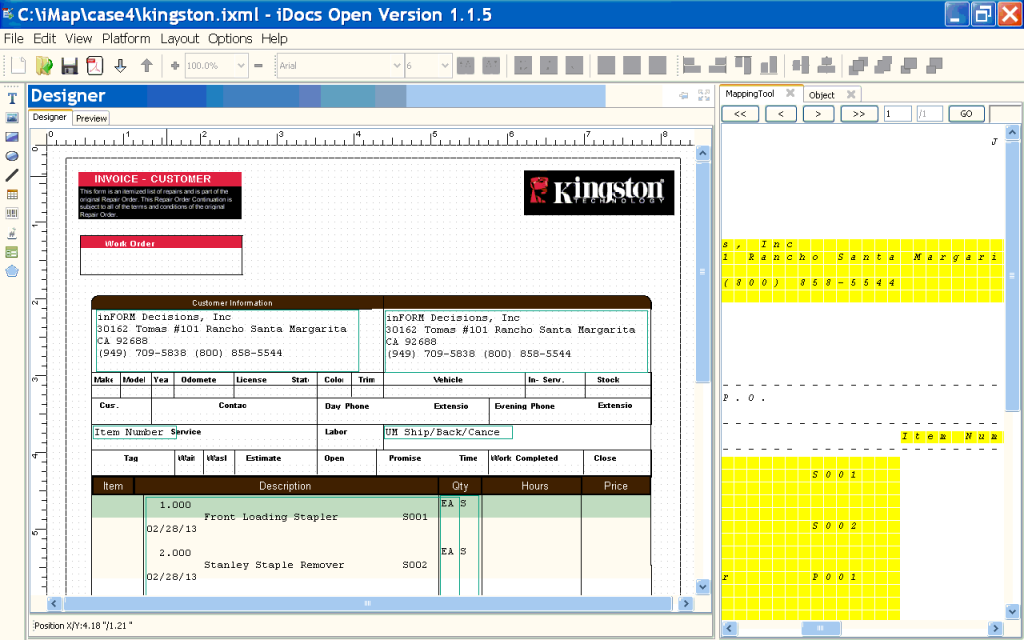
iMap will work with a GUI (Graphical User Interface) mapping tool to map data from a print or spool file onto the designed form, which will store this information for ongoing form-data merge operations (see iDocs).
Print files or IBM spool files can be downloaded into the right pane to be dragged and dropped into appropriate locations on the form. Multiple properties can be applied to the mapped data, including fonts, routing conditions, colors, burst and sort conditions, object and signature merges and more.
Designed Mapped Form Using iMap
The latest version of inFORM’s powerful graphical data mapping tool has numerous benefits including:
- Defines fields for conditional applications, such as document routing, image placement, and database mapping. iMap will run in Win 7 and Win 10 environments, both 32 and 64 bit.
- Incorporates multiple features for designing intelligent, powerful IBM i reports, forms, checks and other business documents.
- Is an open-designer, forms import data mapping utility, which can work with any form or graphic design tool that runs in Windows – Word, Adobe, PowerPoint, Excel, and more – versus the standard approach using a proprietary forms designer.
- It allows you to create any business form, MICR check, report, scalable and three dimensional barcode and Chinese (Unicode) characters (or DBCS double byte).
- It supports COLOR documents.
- Users can draw rectangles, ovals, text boxes, fonts, MICR fonts, scalable barcodes (including QR codes), and import multiple graphic formats. Properties can be applied to any drawn object, including fill, size, borders, colors and textures.
Contact inFORM Decisions for more information: http://www.informdecisions.com/iMap/
--
Popular keywords: AS/400 reports , AS/400 spool file


0 comments:
Post a Comment